My reef lights were still running a schedule for dead corals
My aquarium lights were running a schedule for corals that no longer existed. Every day the schedule called for seven-plus hours of UV, violet, and royal blue at 100 percent, which is great for coral and even better for cyano. As it turned out, the tank wasn’t getting 100 percent, or even the right time of day, but I didn’t know that yet. Fixing that should have taken five minutes in the EcoTech Mobius app. I hate the Mobius app. So instead I spent a night teaching a Raspberry Pi to talk to my lights and pumps directly, with a coding agent doing most of the talking.
Why not just use the app
The corals died, the tank is fish-only now, and it has a cyano problem. The two Radion lights and two VorTech pumps were still tuned for a reef. The only official way to change them is the Mobius app, and Mobius gear is Bluetooth-only: no Wi-Fi, no local API, nothing on the network to point a script at. If I wanted control without the app, something had to sit near the tank and speak Bluetooth.
The pieces
Hardware: a spare Raspberry Pi 3B+, which has Bluetooth built in. I had no SD card on hand, so it boots from a USB stick. It sits near the tank.
Library: python-mobius by r3pek (version 0.8.4). Someone had already reverse-engineered the protocol from the official Android app, so I didn’t have to sniff a single packet. That’s the part that makes this a weekend project instead of a research project. It ships a command-line tool, mobius-scan.
The agent: Claude Code on my PC, reaching the Pi over SSH and driving the library’s CLI.
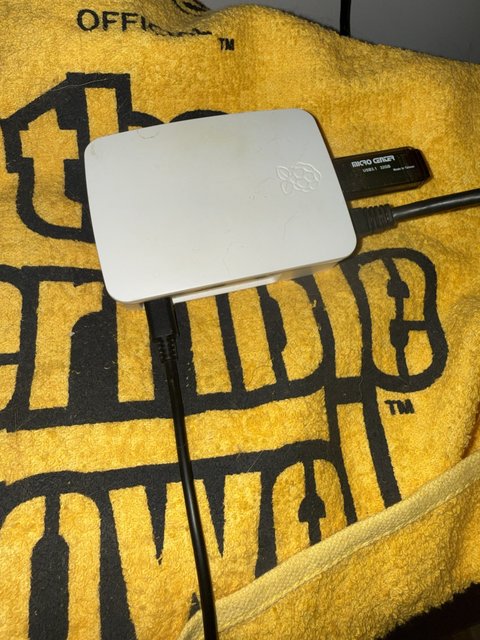
Current home: a towel. Not sure where it’ll live yet.
What it found
A passive scan, with no connections made, found all four devices on one tank network on the first try: two Radion XR30 G4 Pros and two VorTech MP40s. One wrinkle: the devices rotate their Bluetooth addresses, so the address you see today isn’t the one you’ll see tomorrow. Everything after that targeted devices by serial number instead.
A read-only connection to each one filled in the rest: pump mode and live speed, flow in GPH, motor temperature, per-channel light intensity, day/night state, and saved scenes. That was already more than the app shows me in one place.
Changing things without breaking them
Reading is safe. Writing to the gear that keeps fish alive is not, so the rules went in before any writes did.
Backups first. Every device’s schedule got saved twice: as JSON, and in the app’s own .mob template format. If anything went wrong, the old schedule was one command away.
Trust, but verify. The library itself marks schedule writes as not yet checked against real hardware. That’s an honest label and I took it seriously: one device at a time, and after each write, read the schedule back and diff it against what was sent.
Here’s what that looked like in practice. Around 2:40 in the morning I told the agent: “I’d like to change light schedules, pump speed, and such to become more optimal… turning the lights down to fix cyano would be a good idea.” It asked about the tank, built the new schedules on the Pi, and came back with this (its schedule tables trimmed):
The proposed schedules are built on the Pi. Nothing has been written to any device yet.
How I’d apply them, one step at a time, checking each:
- Pump #1, then read it back. If the saved schedule matches, the write path works.
- Pump #2, read it back.
- One light. The two Radions share a schedule group, so writing one updates both. Then I read both back.
- If any read-back doesn’t match, I stop and restore that device from the backup.
Go ahead with all four?
I said yes. Five minutes later, every read-back matched, including the second Radion, which I never wrote to directly.
What actually changed:
- Lights: the 9 AM to 9 PM coral schedule became a 1 PM to 9 PM fish-only schedule, peaking around 25 to 35 percent, with UV and violet off entirely.
- Pumps: more flow to make up for a gyre pump I’m pulling out, kept moderate so it doesn’t splash and cause salt creep.
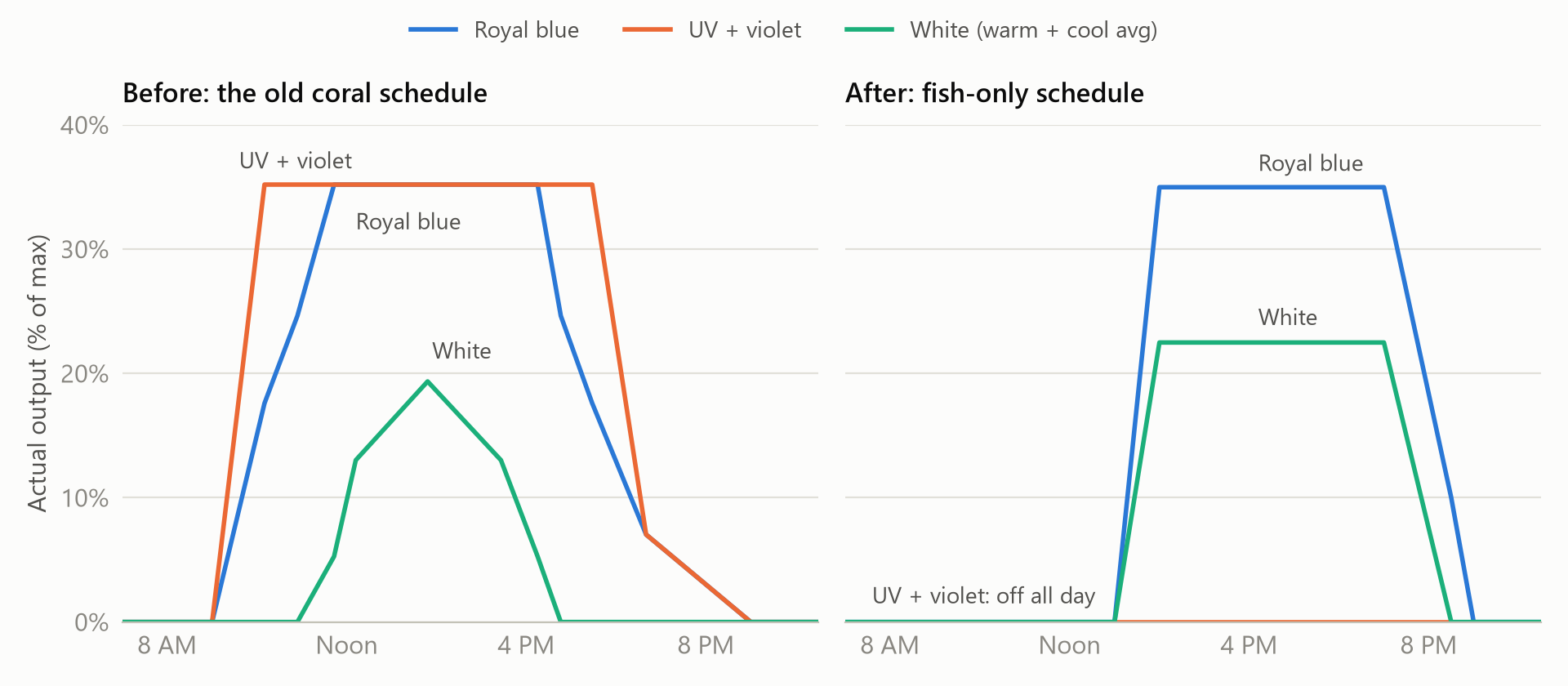
Rebuilt from the backups, not a screenshot. Same royal blue peak; the UV and violet are gone, and the day is four hours shorter.
Two things the lights hadn’t told me
Every read-back had matched. The next afternoon the tank was still dark. A read-back proves the lights stored what I sent. It doesn’t prove what the tank is actually getting. Two things were hiding behind that gap.
The lights were secretly dimmed. The Radions store an intensity setting that multiplies every channel in the schedule. Mine was set to 0.352, left over from a 30-day acclimation ramp I ran in February 2025, and nothing ever set it back. The old coral schedule hid it: “100 percent” UV was really about 35 percent, and had been for months. My new schedule treated its numbers as final output, so royal blue came out at about 12 percent instead of 35. The fix was to rewrite the same schedule with every channel divided by 0.352. The library has no way to reset the multiplier, so until I find one, every number I write gets that correction. The Apex’s power log backs this up: at the old schedule’s brightest, both lights together drew under 80 watts above idle, nowhere near what two Radions pull at full blast.
The clock really was six and a half hours behind. Every device reported the same drift, and at first I left it alone because the lights seemed to be on at the right times. That “seemed” came from the library’s intensity readout, which turns out to be its own calculation from the schedule and the Pi’s clock, not a reading from the lights. The Apex’s power log has no such blind spot. The day before, the old schedule’s noon-to-4 PM peak had actually run from about 6 PM to 10:30 PM. After the new schedule went in, the tank sat dark at 2 PM because the lights thought it was still morning. One “set time to now” on the main Radion fixed it, and the correct time spread over the tank’s own mesh network to the other Radion and both pumps without any more writes. The time zone had been right all along; only the clock had drifted.
I’m still glad I didn’t run that command on day one. A clock you don’t understand is exactly where “fixing” it can make things worse. It just turned out the thing I was afraid of had already happened.
What fought back (mostly not the Mobius part)
The Bluetooth part was the easy part. Everything around it was harder.
I locked myself out of the Pi on setup. Raspberry Pi Imager asks for your public SSH key. I pasted my private one. The Pi booted with no usable key, key-only SSH, and me on the outside. Fixing it from the USB stick on Windows took longer than it should have: editing cloud-init’s user-data did nothing, because Pi OS pins the cloud-init instance ID in cmdline.txt, so cloud-init thought it had already run. What worked was the old-style trick: a one-shot systemd.run= script that installed the right key and then removed itself.
My router swap took the network down mid-upgrade. The Pi’s first system upgrade died halfway through when I replaced my router the same night (that’s its own story). Rerunning it as a detached systemd-run job meant the next network hiccup couldn’t kill it.
Bluetooth was off. It was soft-blocked by default. sudo rfkill unblock bluetooth fixed it.
The guardrails earned their keep
I ran the agent in auto mode, and it still stopped to ask before writing to the devices, with the whole plan on the table and nothing touched yet. Later, while I slept, it refused to start a network-listening service on the Pi without me. Both times, stopping was the right call. Changing a live animal’s environment and opening a new port on my network are exactly the kinds of things I want a human to approve, even when the agent is probably right. I’ve written more about this in Guardrails for Coding Agents.
What’s next
Running now: one place to see the whole tank. A small service on the Pi (the one the agent wouldn’t start without me) reads all four Mobius devices every ten minutes, and new tools in my homelab MCP server, which gives an agent scoped access to the rest of my homelab, combine that with the tank’s Neptune Apex controller. The Apex shares its sensor readings and history with anything on my home network, no login needed. It isn’t reachable from the internet, since my router has no port forwards to it. Its status data does include one secret, the pairing key for Neptune’s Fusion cloud service, and my tools strip it out before returning anything. One question to an agent now gets lights, pumps, temperature, pH, and salinity in a single answer.
Next: let the agent change things on the Apex, too. Right now it can only look. I want it to start Feed Mode (which pauses the pumps so food doesn’t get blown around the tank), switch individual outlets on and off, and run a backup thermostat program for the heater. Each of those gets the same rule as the lights: the agent shows me exactly what it will change and waits for my yes.
Started: a camera on the Pi. Numbers only tell part of the story. With a camera, an agent could actually look at the tank: is the cyano spreading, is the water level right, is salt building up on the rim. That’s where this gets interesting. So far: a Logitech C920 is plugged into the Pi, and test snapshots work, one frame grabbed with ffmpeg after letting auto-exposure settle. The first shot was a close-up of the side panel, glass coated in red film with a blue cast over everything, so framing and white balance still need sorting out. It isn’t wired into the bridge or the agent’s tools yet. Two lessons already: I tried an Elgato Facecam first, and it needs USB 3, which a Pi 3B+ doesn’t have. And the Pi logs undervoltage warnings, so a proper power supply is on the list.
If you’d like to read about the camera setup as I build it, let me know: I’m @roho.foo on Bluesky, or email nick_notes@icloud.com.