The 3 AM router swap
My plan for moving the house to UniFi said, in writing, that it “might break the internet for an evening,” so do a phased cutover and keep the old router’s config around as a rollback. “In writing” is generous: it was a card on my backlog board. Not writing things down is going to be a theme here.
That was the plan. Then I finally finished my 3D-printed rack parts: keystones in, cables punched down, every port facing forward instead of hiding on the back. I’m always fancy. And once the fancy parts were done, they obviously needed to go in the rack. Tonight.
At 7 PM I went down to the basement to install them. At 11:30 PM my network was running on a brand-new gateway, on the wrong subnet, and nothing in my homelab could find anything else. At 2:37 AM my aquarium lights were talking to a Raspberry Pi.
This is what happened in between.
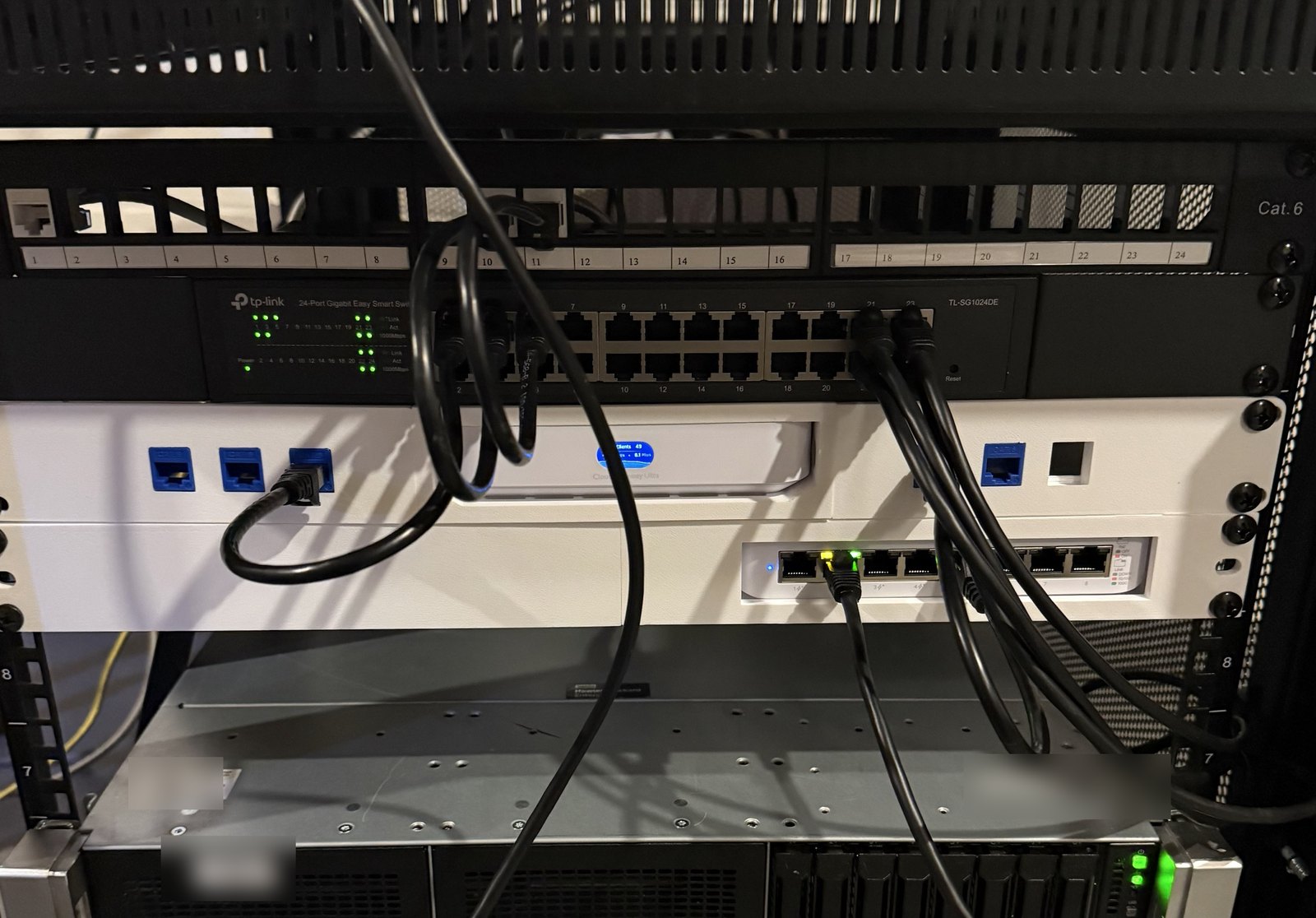
The rack as it is now. The white part is printed: the gateway’s ports face the back, so the front panel has keystones and short cables loop around. Eris is the server underneath.
7:04 PM: the plan meets the basement
The whole point of the upgrade was Wi-Fi VLANs: putting the smart plugs, TVs, and game consoles on their own networks, away from the servers. My old ASUS router couldn’t do that, and UniFi can. The safe version of the project was slow and boring on purpose.
The version I actually did started with powering down both Proxmox nodes, Eris and Ares, so I could put the new gear in the rack and move Eris onto her new rails. (Eris is named after the Greek goddess of strife, the one who started the Trojan War with a single golden apple, because that’s exactly what setting her up the first time was. Ares is named after her brother. And yes, Eris is a “she.” If she ever becomes sentient, I’m sure she’ll correct me.)
The new gateway has all its ports on the back, which is useless in a rack, so it sits in a printed rack mount, with keystone ports on the printed front panel and short cables running from the gateway’s back ports around to the front. I crimp my own cables, so every one of those was cut, punched down, and popped into a keystone by me. The mount itself isn’t my design: it’s Brayden’s on MakerWorld, and the other printed rack pieces are two models by stijn, who apparently loves networking and 3D printing as much as I do.
Installing it meant pulling every cable out of the wall port for my drop and rewiring everything through the new front panel. Somewhere in there, “phased cutover” quietly became “well, it’s all unplugged anyway.”
The new gear went in, and I hooked the old ASUS router back up first. I was still trying to stick to the plan, and the plan said the ASUS stayed in charge for now. So I went upstairs to my desktop, the one computer in the house with an Ethernet port, half expecting it to just work. It did not. Everything could connect, but nothing could look up a name, because I had no DNS. My DNS is two Pi-holes, and both of them run on Eris and Ares, which I had just turned off. Eleven days earlier I’d removed the public backup DNS server from my router on purpose, to fix a different problem. Two Pi-holes on two different servers is exactly the redundancy for one of them failing. It is not redundancy for me turning both of them off on purpose, on the night I swap the router. So the house had no DNS at all.
In hindsight, I could have reset the ASUS and been online in minutes. But ASUS routers and I have a history with factory resets, and at the time, the brand-new gateway sitting right there looked like the easier way out. (Narrator: or just pointed the ASUS’s DNS setting at a public server. Its admin page works by IP address, no DNS required. Honestly, this did not occur to anyone in that basement.)
So I pivoted to the new gateway, figuring that any working network beat no network, and I could sort out the details later. The details, it turns out, were the whole night. I hadn’t planned to turn it on that night, so I hadn’t read the manual. Things I learned in the next few minutes: it has no Wi-Fi of its own. The only computer in the house with an Ethernet port is upstairs. And my phone’s cellular data was crawling. But I’ve been messing with Bluetooth a lot lately (my reef lights, which come up later), and I thought: maybe. The UniFi app can set up a gateway over Bluetooth. It took over five minutes to download over that cellular connection, but it worked.
Then the gateway couldn’t find the modem.
When every cable between the modem and the router is one you made yourself, the cables are suspect number one, and I had no way to tell which one. Even the modem’s cable was new: it used to plug straight into the old router, and now it ran into a network port on the rack. I checked and re-checked my own work for most of the evening. I power-cycled the modem. Nothing. Eventually I did the oldest fix there is: I unplugged the router and plugged it back in. It found the modem immediately.
My cables were fine, for the record. They’re the ones I’m using right now. In hindsight, the problem was probably the order. A cable modem remembers the last router it talked to, and it only hands an internet address to a new one after it has been restarted. If the new router asks while the modem is still booting, it can come away with nothing and just sit there. Replugging the router made it ask again, this time of a modem that was ready to answer. The order that avoids all of this: modem off, new router connected, modem on and fully up, and only then power on the router.
That was the good news. The bad news was what it did next.
11:13 PM: online, and everything is stranded
The gateway’s own log starts at 11:13 PM. Everything before that, the whole evening of “can’t find the modem,” left no trace, because it couldn’t finish setting itself up without the internet. Once it could, it moved fast: within ten minutes it had updated its own firmware, I’d adopted the new switch and access point from my phone and recreated our Wi-Fi, and the family’s phones were reconnecting.
On the wrong subnet. A factory-fresh UniFi gateway hands out addresses on its own default subnet. Everything in my homelab lives on a different one, with fixed addresses: both Proxmox nodes, both Pi-holes, the reverse proxy that fronts every *.roho.foo site, and the MCP server my coding agent uses to manage all of it. My PC came up on the new subnet, looked around, and found nothing. The agent’s first message back was, roughly, “your PC is on the wrong network.”
The first fix was easy: move the gateway’s default network to the old subnet. That brought back eight devices. None of them were servers.
12:15 AM: “I don’t remember how to log in to iLO”
One server wasn’t answering at all. Of course it was Eris, the one who’d just gotten new rails. I brought her a gift, and she started a war. Very on brand.
The way in when the network is gone is the server’s management card, which gives you a remote console from a browser. Eris is an HP, where it’s called iLO (“Integrated Lights-Out”). Her brother Ares is a Dell, where the same thing is called iDRAC (“integrated Dell Remote Access Controller”). The lowercase i is there because it’s built into the motherboard, and since it showed up around 2008, we can probably blame the “i” on Steve Jobs. The generic name is BMC. Who comes up with these names?
Whatever you call it, it only works if you know the password. I did not know the password. (Writing this, I realized I’m not sure I know Ares’s either. I’m starting to notice a pattern in my outages, and the pattern is me.)
I did have a photo of it. Thank you, past me, for being too lazy to go find a pen.
12:30 AM: not all ports are the same port
She had booted perfectly, which somehow made it more annoying. She’d been up for over two hours with no network. From the iLO console, ip -br link showed the problem immediately: the network bridge was attached to the fourth port on the network card, and that port said NO-CARRIER. The cable was in the first port, with a live gigabit link.
That one’s on me, and it’s a very software-developer mistake. I mostly write code; server hardware isn’t something I touch every day. When I re-racked Eris, I plugged the cable into the first port, because in my head network ports were like the ports on an unmanaged switch: they’re all the same, use whichever. On a server they aren’t. Each port is its own network interface with its own name, and my Proxmox config said “the network lives on port four.” Ports one through three weren’t configured to do anything at all, so Eris was plugged in, with a link light, talking to nobody.
A word about that iLO console: it’s a remote screen in a browser tab, and mine had no copy or paste. (Maybe mine is broken. I honestly don’t know.) So every bit of output went to the agent as a screenshot, and every command it sent back, I retyped by hand, one character at a time, at half past midnight.
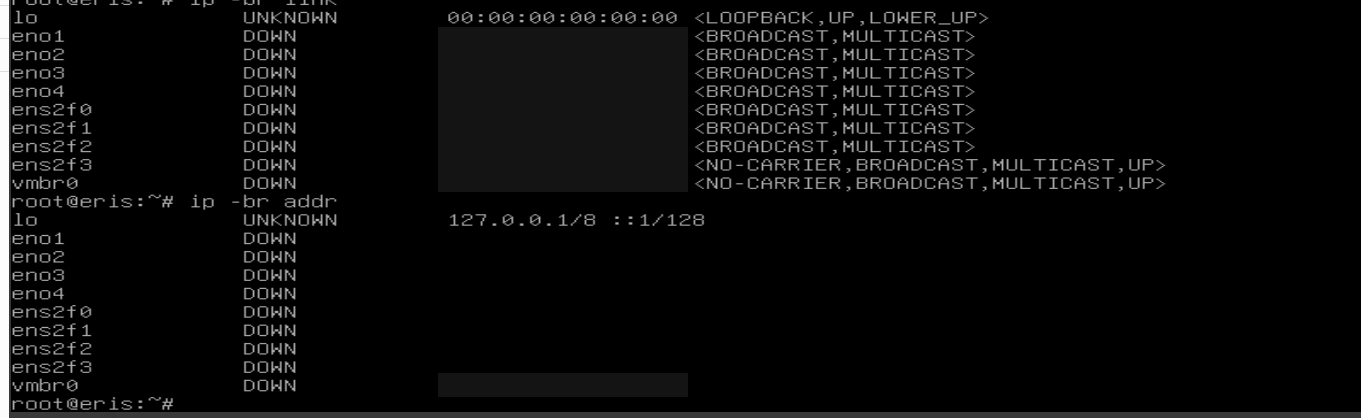
What ip -br link looks like when the cable is in the wrong port. Addresses blacked out.
The obvious fix was to move the cable to port four. But the cable was in the basement, and I was not going down to the basement for the thirtieth time that night, because of course the only computer in the house with an actual Ethernet port is upstairs. So I did it the other way around: from the iLO console, I moved the network bridge to the port the cable was already in, and it came straight back. Later that night I made the change permanent in the network config, because a fix that disappears on the next reboot is just a delayed outage.
12:45 AM: the servers wandered off
With DNS pointed back at the Pi-holes, most things came up. Two didn’t: my game servers. Minecraft and ARK had both come back on new addresses, and the tunnel that lets my kid’s friends reach them from outside was still forwarding to the old ones.
That’s when it clicked. Their “fixed” addresses had never been fixed on the servers themselves. They were DHCP reservations, stored in the old router. I’d swapped out the router, and all of that state went with it.
That one’s on me too. I gave almost everything else in the homelab a static address, just not the game servers. In my defense, changing a game server’s network settings means taking it down, and I’m running a strict 99% uptime SLA for my kids. That’s my story and I’m sticking to it.
I think I gave them static addresses with the new router that night. I was tired. (Narrator: they were not static. UniFi calls them “fixed IPs,” and they are DHCP reservations again, just in the new router this time. Some lessons take two outages.)
12:46 AM: building a UniFi MCP module, at 12:46 AM
Here’s the thing: I’m new to UniFi, and my gateway had been running for about an hour and a half. I didn’t know where anything lived in its settings, and it was past midnight. We’d already needed its DHCP and DNS settings three times. But I have a habit of building MCP servers for things I run, and my agent knows how I like them built. So I asked it to build a UniFi module for my homelab MCP.
Before writing any code, it went back to the notes on how the rest of my MCP is built and the module for the old ASUS router, so the new one would work the same way. The main lesson from the ASUS module was to test against the real device before writing any code that parses it, so it probed the gateway’s API first. UniFi turns out to have two APIs, and the same key works on both. Only the older one can set a fixed address.
Its first real write, pinning Minecraft back to its old address, got blocked by Claude Code’s auto mode: a change to my live router that I hadn’t explicitly approved. Fair. I said yes, did ARK too, and Minecraft was reachable from the internet again within a minute.
By 1 AM the module was written, tested, and deployed. Every write in it follows the same pattern: preview by default, require a confirmation, then re-read the router to prove the change actually saved.
1:15 AM: the agent lost its internet while fixing mine
I approved fixed addresses for ten servers at once. Partway through, the agent’s own connection dropped: “Can’t reach the API server.” For fifteen minutes, the thing fixing my network couldn’t get to the network. When I came back, all ten had applied, and each one had been checked. Seven more followed: the nodes, the management cards, the aquarium controller, the Pi. By the end, nineteen devices had addresses that live in the new router, where I can see them.
1:30 AM: side quests
My old ASUS mesh point was still trying to find its old parent router, which locks you out of its settings until you factory-reset it. So I reset it into a plain access point. It took several attempts. See: history, ASUS, factory resets. I ran a speed test from the gateway: 1,125 Mbps down on a 1 Gbps plan, and 905 on my wired PC. The internet connection had never been the problem.
2:09 AM: “I might’ve broken Eris”
Eris, living up to her name. Around 2 AM I rebooted her, partly to make sure the permanent fix really was permanent and partly because it had updates waiting anyway. The fix held. Everything else about that reboot was bad timing: my nightly backup starts at 1 AM and runs for close to an hour, and the reboot landed in the middle of it. The reverse proxy’s container came back locked by a half-finished backup snapshot, Proxmox won’t start a locked container, and every *.roho.foo site went dark. Clearing the leftover backup snapshots brought it all back. New rule: don’t reboot that node between 1 and 2 AM.
2:37 AM: the reef
The whole reason my Raspberry Pi hadn’t been talking to my aquarium lights yet was that its software upgrade had died halfway through, the evening before, when the network dropped. Rerun, finished, and at 2:37 AM the Pi read all four devices on the tank for the first time. That turned into its own post.
Then: “It’s almost 3 AM, so I’m going to bed.”
What I’d tell past me
Your router is a database. The DHCP reservations and the DNS servers it hands out are configuration, the rest of your network quietly depends on them, and none of it moves when you swap the box. Most of my night went to rebuilding state I’d never written down. Export it first, or better, put it somewhere you manage on purpose. Mine now lives in a tool that previews every change and checks that it saved.
Also: know where your break-glass password is. Mine was in my camera roll. It worked.
Looking back, the whole night was one lesson wearing different outfits. The plan was a card on a board. The password was a photo. The addresses lived in a router I was about to unplug. Ares’s password lives nowhere at all yet. (That one’s on the board now. Which is, I realize, a card on a board.) Write things down. Somewhere real.